Security / Incident Response · Published 2026-10-24
PHP2Shell Aftermath: How to Audit PHP Runtimes and Verify Your Remediation
Audit PHP runtimes after PHP2Shell, verify patched versions across PHP-FPM, containers and Kubernetes, and validate remediation safely.
The patch is only the beginning
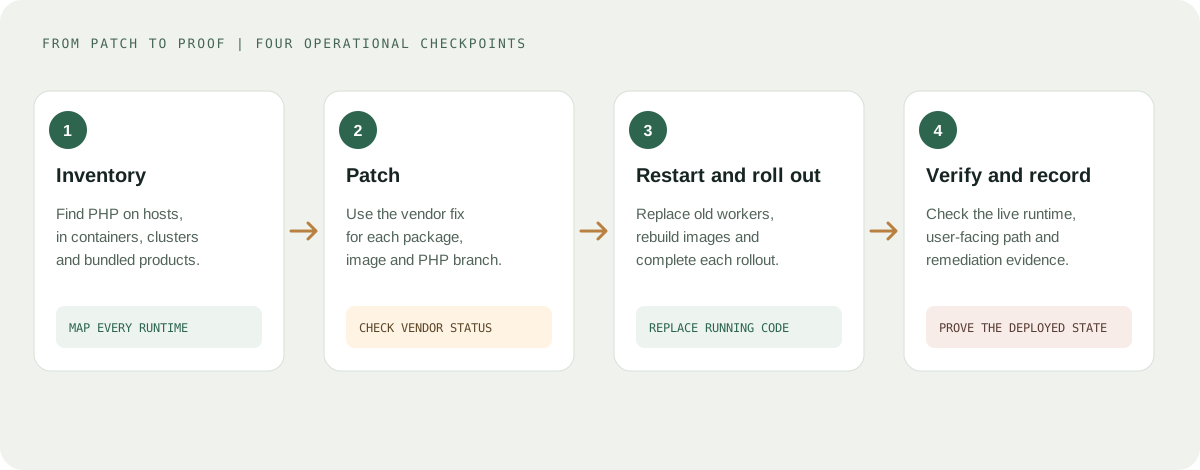
PHP2Shell exposed a familiar weakness in infrastructure operations: knowing that a patch exists is not the same as knowing that every production runtime is protected.
On October 21, 2026, the PHP project released security updates addressing two critical vulnerabilities, CVE-2026-109618 and CVE-2026-109619. Both are rated CVSS v4.0 9.2 and can enable unauthenticated remote code execution on affected systems.
Every PHP installation that serves web requests is in scope, including PHP-FPM, Apache mod_php, php-cgi, FrankenPHP and LiteSpeed. The PHP project considers the risk highest for mod_php, where it demonstrated an exploit in which an unauthenticated request triggers the attack before any application code runs.
The patched upstream releases are:
| PHP branch | Minimum fixed upstream release |
|---|---|
| PHP 8.5 | 8.5.12 |
| PHP 8.4 | 8.4.27 |
| PHP 8.3 | 8.3.36 |
| PHP 8.2 | 8.2.35 |
These are the specific fixed releases published in the October 21 advisory, not a recommendation to stay on these versions indefinitely. Use the latest supported security release for your branch. PHP 8.2 reaches end of life on December 31, 2026.
Version numbers are not enough on distribution packages. The table lists upstream release numbers. Debian, Ubuntu and RHEL-compatible distributions typically ship the fix as a backport and keep the old version number. For example, Ubuntu's fixed php8.3 package for 24.04 LTS is 8.3.6-0ubuntu0.24.04.13 (USN-8948-1), which still reports PHP 8.3.6. On such systems, php -v does not tell you whether you are patched. Section 2 shows how to check.
PHP 8.1 and older are affected too. These branches no longer receive updates from the PHP project. Some distributions and LTS vendors provide backported fixes, and the PHP security team published minimal source backports for PHP 7.4, 8.0 and 8.1 for people building from source. The last section covers your options.
Sources: Official PHP security advisory, ENISA joint statement, CISA alert.
The operational challenge is broader than upgrading a single server. PHP may run through PHP-FPM, Apache mod_php, CGI, FrankenPHP, LiteSpeed, container images, Kubernetes workloads or a third-party application that bundles its own runtime. This applies equally to SilverStripe, WordPress, Drupal and any other CMS or framework: upgrading the application does not change the PHP runtime beneath it.
A successful remediation therefore requires three things:
- Identify every exposed PHP runtime.
- Apply the appropriate security updates.
- Verify the versions and configurations actually serving requests.
1. Inventory PHP across the infrastructure
Start by identifying where PHP is installed. Do not assume that the PHP executable in your shell is the same runtime used by the website.
On Linux, run:
# Identify the CLI PHP executable and version.
command -v php
php -v

# List installed PHP-related packages on Debian/Ubuntu.
dpkg-query -W -f='${binary:Package}\t${Version}\n' \
  'php*' 2>/dev/null

# List installed PHP-related packages on RHEL-compatible systems.
rpm -qa | grep -E '^php([0-9.-]|$)'

# Show enabled PHP module streams on RHEL-compatible systems (if modules are used).
dnf module list --enabled php 2>/dev/null || true
These commands provide an initial inventory. They do not prove that every running service has been updated.
Next, inspect running processes and services:
ps -eo pid,comm,args | grep -E '[p]hp-fpm|[p]hp-cgi|[l]sphp|[f]rankenphp|[h]ttpd|[a]pache2'

systemctl list-units --type=service --all \
  | grep -Ei 'php.*fpm|apache2|httpd|nginx|frankenphp|lsws'
Also inspect your container registry, deployment manifests, scheduled jobs and application-specific runtime images.
Many commercial and open-source products rely on PHP in the background, so some may be affected even if they do not appear to use PHP directly. The Dutch NCSC maintains a list of third-party software that includes PHP.
Important: package names and service names vary by distribution. A host can also serve traffic from containers whose PHP versions are completely independent of the host's installed packages.
2. Verify PHP-FPM, not just the CLI
Consider a server where the CLI reports PHP 8.3.36, but a PHP-FPM pool is still running an older binary after an incomplete deployment.
The shell check passes. The website remains vulnerable.
Identify the running FPM processes:
pgrep -a php-fpmInspect the executable associated with a specific process:
PID=<php-fpm-worker-pid>

# A "(deleted)" suffix means the binary was replaced on disk
# but the old one is still running.
readlink "/proc/$PID/exe"
Replace the placeholder with a PID from the process listing. On Linux, /proc/<pid>/exe can help identify the executable used by a running process. Access may require elevated privileges. Note that php-fpm -v reports the binary currently on disk, not necessarily the one a running process was started from.
You can also list services that still run outdated code:
needrestart -b | grep NEEDRESTART-SVC   # Debian/Ubuntu
dnf needs-restarting -s                  # RHEL-compatible
After updating the appropriate package, restart the relevant service according to your deployment procedure. Installing a package does not guarantee that running workers were replaced, and mod_php requires restarting Apache. For example:
sudo systemctl restart php8.3-fpmUse the actual service name for your installation.
Then check the process again and verify the version through a controlled application-level health check or an equivalent trusted mechanism.
Do not expose phpinfo() on a public endpoint to perform this check. It can disclose sensitive configuration details.
Distribution packages: check the changelog, not the version
If PHP comes from your distribution's own packages, compare against the vendor's advisory rather than the upstream version table. A patched package can report an older version. Check that the package changelog references both CVEs:
# Debian/Ubuntu (replace 8.3 with your branch)
zgrep -E 'CVE-2026-10961[89]' /usr/share/doc/php8.3-common/changelog.Debian.gz

# RHEL-compatible
rpm -q --changelog php-common | grep -E 'CVE-2026-10961[89]'
Both CVE IDs should appear. If only one does, or neither, the package is not fully fixed. Third-party repositories can lag behind the distribution's security channel, so check each repository's status separately.
3. Patch container images and Kubernetes workloads
Updating PHP on the host does not update PHP inside an existing container.
For a Docker-based deployment, inspect the base image and build a new image using an approved, patched PHP release. Official php images on Docker Hub are built from upstream PHP releases, so the version number is meaningful there. Images that install PHP from a distribution package are not: use the changelog check from section 2.
For example, a Dockerfile might contain:
FROM php:8.3.36-fpm

WORKDIR /var/www/html

COPY . .

CMD ["php-fpm"]
This is an illustrative starting point, not a complete production Dockerfile. Pin images according to your organization's image policy (ideally by digest), validate the exact upstream tag, and include the application dependencies and required extensions.
Build and inspect the image:
docker build --pull --no-cache -t my-application:php2shell-fix .

docker run --rm my-application:php2shell-fix php -v
--pull --no-cache prevents a stale base image or cached layer from carrying the old runtime into the new build. The second command verifies the CLI version inside the image. It does not, by itself, prove that the deployed service is running that image.
For Kubernetes, list the images of all running pods, not only Deployments. This also covers StatefulSets, DaemonSets, Jobs and bare pods:
kubectl get pods -A -o jsonpath='{range .items[*]}{.metadata.namespace}{"/"}{.metadata.name}{"\t"}{range .status.containerStatuses[*]}{.image}{"@"}{.imageID}{"  "}{end}{"\n"}{end}'

# CronJobs that are not running right now do not appear above.
kubectl get cronjobs -A -o jsonpath='{range .items[*]}{.metadata.namespace}{"/"}{.metadata.name}{"\t"}{.spec.jobTemplate.spec.template.spec.containers[*].image}{"\n"}{end}'
After deploying the rebuilt image, check rollout status:
kubectl rollout status deployment/my-application \
  -n production
Replace the deployment and namespace with your actual values.
Then verify what every replica actually runs:
# Replace the namespace and label selector with your actual values.
for pod in $(kubectl get pods -n production -l app=my-application -o name); do
  echo "$pod: $(kubectl exec -n production "$pod" -- php-fpm -v | head -n1)"
done
A successful rollout is useful evidence, but it is not sufficient on its own. Confirm that the running image contains the fixed PHP release and that no old replica, alternate deployment or independently managed workload remains exposed.
4. Interim mitigations and the session upload-progress advisory
Only an update is a complete solution. For systems that cannot be updated immediately, the PHP project lists the following measures. They reduce exposure to specific attack paths but do not make an installation safe.
| Measure | Addresses | Limitations |
|---|---|---|
memory_limit=-1, set where applications cannot override it (php_admin_value in the FPM pool or Apache configuration) | CVE-2026-109618 | Removes the controllable memory-limit failure only; an underlying allocation failure can still reach the vulnerable path. An unbounded limit lets one request consume host memory, so pair it with a container or cgroup limit. Verify that no pool, directory or application setting restores a finite limit. |
Low post_max_size (8M if the application needs no uploads, 32M if it does); keep upload_max_filesize below it | CVE-2026-109618 | May break legitimate uploads. Size it per application. |
| Web server or proxy limits on decoded request size, input field count, multipart part count, header count and nesting depth | CVE-2026-109618 | Must also cover requests without a usable Content-Length. |
| Container or cgroup memory limit, ideally killing only the affected worker | Availability | Do not use RLIMIT_AS or RLIMIT_DATA: they can cause the vulnerable allocation failure. |
session.upload_progress.enabled=0 | CVE-2026-109619 | Blocks the confirmed session paths, not other variants. |
fatal_error_backtraces=0 (PHP 8.5 only) | CVE-2026-109619 | Blocks only the confirmed fatal-backtrace path. |
PHP also recommends removing invalid or deprecated per-request settings that emit diagnostics before initialization (hiding diagnostics with error_reporting, display_errors or @ does not help), and fixing attacker-reachable fatal errors and execution timeouts.
A web application firewall may provide some protection while you update, but it is not a remediation. Treat it as a temporary layer.
Where you apply these settings matters. Use php.ini, an FPM pool or a server configuration that applies before request parsing, then restart every worker. Do not rely on ini_set() or FPM .user.ini files. Editing the CLI configuration alone leaves PHP-FPM and Apache unchanged.
The October 23 advisory
On October 23, the PHP project published an informational advisory about session upload progress. It recommends setting session.upload_progress.enabled=0 until the next regular bug-fix release, to fully protect against an unlikely remote-code-execution vector.
This is related to, but not the same as, the October 21 advisory. The setting was already listed as a mitigation for CVE-2026-109619 on October 21. The October 23 advisory concerns a separate issue, CVE-2026-115560, which PHP will document in full with the next release. If you applied the setting on October 21, keep it in place.
The vector requires an unusual combination. An application must set session.serialize_handler to php_binary or php_serialize in its configuration, then switch it to php at runtime with ini_set() before calling session_start(), while session upload progress is still enabled. Applications that never change the serialize handler at runtime can keep the feature enabled. You can check your code with:
grep -RIn "session.serialize_handler" /path/to/applicationThis is a supplement to installing the PHP2Shell security updates, not a replacement.
Check the CLI configuration:
php --ini
php -i | grep -E 'session.upload_progress.enabled|Loaded Configuration File'
These commands report CLI settings only. For PHP-FPM, check the FPM binary's own configuration and the pool overrides (replace 8.3 with your branch):
# php.ini values as seen by the FPM binary.
php-fpm8.3 -i | grep -E 'session.upload_progress.enabled|memory_limit|post_max_size'

# Effective FPM configuration, including pool-level php_admin_value overrides.
php-fpm8.3 -tt 2>&1 | grep -Ei 'upload_progress|memory_limit|post_max_size'
Then validate the effective value through an approved, non-public diagnostic mechanism.
Official reference: PHP: Informational advisory, session upload progress.
5. Make runtime verification part of CI/CD
Manual audits are useful during an emergency. Repeating them manually across every deployment is a poor long-term control.
A simple version gate that compares PHP_VERSION to the fixed release is easy to write and easy to get wrong. On a distribution package it fails in the wrong direction: a patched Ubuntu 24.04 host reports 8.3.6 and would be rejected, while a naive workaround of loosening the check would let vulnerable builds through.
The script below handles both cases. It passes when the binary is at or above the upstream fixed release for its branch, or when the owning package's changelog references both CVEs (a vendor backport). It fails closed: an unknown or unsupported branch, or a package it cannot verify, does not pass.
#!/usr/bin/env bash
# php2shell-gate.sh - fail-closed check for CVE-2026-109618 / CVE-2026-109619.
#
# Passes when either:
#   1. the PHP binary is at or above the upstream fixed release for its branch, or
#   2. the owning distro package changelog references BOTH CVEs (vendor backport;
#      Debian/Ubuntu/RHEL keep the old version number, e.g. Ubuntu 24.04 php 8.3.6).
#
# Works on any PHP SAPI binary that supports "-v": php, php-fpm8.3, php-cgi.
#   PHP_BIN=/usr/sbin/php-fpm8.3 ./php2shell-gate.sh
#
# Exit codes: 0 = patched, 1 = vulnerable or unsupported, 2 = cannot verify.
set -euo pipefail

PHP_BIN="${PHP_BIN:-php}"

# Upstream fixed releases from the 2026-10-21 advisory. Update from php.net, not from here.
declare -A MIN_FIXED=( [8.5]=8.5.12 [8.4]=8.4.27 [8.3]=8.3.36 [8.2]=8.2.35 )

# True when $1 >= $2 (version-aware comparison).
version_ge() { [[ "$(printf '%s\n%s\n' "$1" "$2" | sort -V | head -n1)" == "$2" ]]; }

# Reads a changelog on stdin; true only if both CVE IDs are present.
has_cves() {
  local text
  text="$(cat)"
  grep -q 'CVE-2026-109618' <<<"$text" && grep -q 'CVE-2026-109619' <<<"$text"
}

bin="$(command -v "$PHP_BIN")" || { echo "ERROR: $PHP_BIN not found" >&2; exit 2; }
bin="$(readlink -f "$bin")"

raw="$("$bin" -v 2>/dev/null || true)"
ver="$(grep -m1 -oE '^PHP [0-9]+\.[0-9]+\.[0-9]+' <<<"$raw" | cut -d' ' -f2 || true)"
[[ -n "$ver" ]] || { echo "ERROR: cannot parse version from '$bin -v'" >&2; exit 2; }
branch="${ver%.*}"
fixed="${MIN_FIXED[$branch]:-}"

# 1. Upstream build at or above the fixed release.
if [[ -n "$fixed" ]] && version_ge "$ver" "$fixed"; then
  echo "OK: $bin reports PHP $ver (>= $fixed, upstream fixed release)"
  exit 0
fi

# 2. Below the upstream number: may still be a vendor backport.
pkg=""
if command -v dpkg >/dev/null 2>&1; then
  pkg="$(dpkg -S "$bin" 2>/dev/null | head -n1 | cut -d: -f1 || true)"
  if [[ -n "$pkg" ]]; then
    log="/usr/share/doc/$pkg/changelog.Debian.gz"
    if [[ ! -r "$log" ]]; then
      echo "UNKNOWN: $log not readable (docs stripped from image?); cannot verify backport" >&2
      exit 2
    fi
    if zcat "$log" | has_cves; then
      echo "OK: $bin is PHP $ver but package $pkg changelog lists both CVEs (vendor backport)"
      exit 0
    fi
  fi
fi
if [[ -z "$pkg" ]] && command -v rpm >/dev/null 2>&1; then
  pkg="$(rpm -qf "$bin" 2>/dev/null || true)"
  if [[ -n "$pkg" && "$pkg" != *"not owned"* ]] && rpm -q --changelog "$pkg" 2>/dev/null | has_cves; then
    echo "OK: $bin is PHP $ver but package $pkg changelog lists both CVEs (vendor backport)"
    exit 0
  fi
fi

echo "FAIL: $bin is PHP $ver; fixed upstream release for ${branch}: ${fixed:-none (unsupported branch)}; no vendor backport evidence for CVE-2026-109618/109619" >&2
exit 1
Run it against the binary that actually serves requests, for example PHP_BIN=/usr/sbin/php-fpm8.3 ./php2shell-gate.sh, and treat exit code 2 as a failure until verified another way. Slim container images often lack bash or the package documentation the changelog check reads, so for those, verify the base image and digest against your image policy instead.
This is a gate for a known incident, not a universal vulnerability scanner. It checks the binary you point it at, so it does not establish that a running PHP-FPM service was started from that binary (use the process checks in section 2). It also does not establish that the runtime is supported. The MIN_FIXED table must be maintained: add new branches such as PHP 8.6 when they reach general availability, and update the numbers from php.net.
For production pipelines, prefer a maintained policy that checks the approved version for each PHP branch and verifies the actual runtime image or package. Add an inventory report that records the application, environment, runtime version, image digest, patch status and verification timestamp.
6. Investigate before declaring the incident closed
Applying the patch prevents the known vulnerabilities from being exploited against the corrected runtime. It does not establish that the server was never compromised.
The Cyber Security Agency of Singapore reported widespread exploitation attempts and multiple proof-of-concept exploits in its alert, last updated on October 22, 2026. That makes retrospective investigation an important part of remediation.
Review available telemetry for:
- PHP worker processes unexpectedly launching shells or downloading tools.
- Unexplained PHP worker crashes and repeated HTTP 500 responses.
- Unexpected changes to application files, scheduled jobs or administrative accounts.
- Unusual outbound connections and access to credentials available to the application.
- Authentication, cloud audit and database activity inconsistent with normal operations.
For Linux systems, process execution telemetry, EDR records, audit logs and outbound network logs can provide useful evidence. Web access logs alone may not reveal activity occurring inside the PHP runtime.
If you suspect compromise, preserve relevant logs and evidence, contain the affected workload, and investigate credentials and tokens accessible to it. Rotate potentially exposed secrets from a clean administrative environment, and rebuild compromised workloads from trusted artifacts where appropriate.
Do not interpret the absence of suspicious log entries as proof that exploitation did not occur.
7. Define a remediation acceptance checklist
Before closing the incident, record evidence for each item:
- [ ] All internet-facing PHP runtimes have been inventoried, including third-party products that bundle PHP.
- [ ] Every affected runtime has been upgraded to an appropriate fixed release.
- [ ] Distribution packages have been verified by changelog or vendor advisory, not by version number alone.
- [ ] PHP-FPM, Apache, FrankenPHP, LiteSpeed and other relevant services are running the intended patched binaries.
- [ ] Container images have been rebuilt, scanned and deployed.
- [ ] Kubernetes rollouts have completed and old replicas are no longer serving traffic.
- [ ] Any interim mitigations are recorded as temporary, with an owner and a removal date.
- [ ] The session upload-progress setting has been assessed and applied where appropriate.
- [ ] Unsupported PHP versions (8.1 and older) have been upgraded, patched through a verified vendor backport, or isolated.
- [ ] Logs and telemetry have been reviewed for indicators of compromise.
- [ ] Potentially exposed credentials have been assessed and rotated where necessary.
- [ ] Evidence of remediation has been recorded in the change or incident ticket.
For unsupported PHP branches (8.1 and older), do not assume that a newer package number exists or that a configuration workaround fully addresses the risk. In order of preference:
- Upgrade to a supported branch.
- Use a vendor package with a verified backport. This is the lowest-effort option, but you depend on the vendor's timeline and must verify the changelog.
- Build from the PHP project's minimal source backport for 7.4, 8.0 or 8.1. This works without a vendor, but you take over build, patching and testing of an unsupported runtime.
- Isolate the application or take it offline until a safe remediation is available. Both CISA and ENISA recommend this when immediate remediation is not feasible.
Final takeaway
PHP2Shell is a reminder that application security depends on the runtime underneath the application.
Updating a CMS, rebuilding a container or seeing a green deployment pipeline is not enough unless the actual PHP process serving requests has been verified.
Inventory first, patch every exposed runtime, validate the deployed state (by changelog on distribution packages, not by version number), and investigate possible compromise before closing the incident.
References
- PHP: Security advisory, October 21, 2026
- PHP: Informational advisory, session upload progress, October 23, 2026
- ENISA: Joint statement on critical PHP vulnerabilities
- Cyber Security Agency of Singapore: Critical Vulnerabilities in PHP (PHP2Shell)
- CISA: Critical vulnerabilities in PHP require immediate patching
- NCSC-NL: php2shell, third-party software that includes PHP
- Ubuntu: USN-8948-1, PHP vulnerabilities
Security advisories can change. Check the sources above for the latest guidance.
This article is educational information, not incident-response or legal advice. Verify package status with your operating system, hosting, or runtime vendor.