News · Published 2026-11-10
N-able N-central Offline: What MSPs Should Do Now
N-able took N-central offline after 30+ zero-days went public. What to do now, what to check after the hotfix, and monitoring that survives. Not tested.
TL;DR
- N-central is offline on purpose. Late on Sunday 8 November a researcher published proof-of-concept exploits for more than 30 alleged zero-days in N-central (some outlets count 33) in a GitHub repository called Able2Shell. On 9 November N-able took hosted N-central offline in the Americas, Europe and Asia-Pacific and told on-premises customers to take their servers offline too.
- The worst chain is unauthenticated. BleepingComputer describes an XXE in the service-import function that leads to a password reset, command execution as the
nableuser and a new enabled Default Administrator account. Another reported flaw takes code fromnableto root. - N-able says it has seen no active exploitation and is building a hotfix. One report gives an expected time of midday EST on 10 November. At the time of writing there are no CVE numbers, no affected-version list and no fixed build.
- Keep on-premises servers offline until N-able says otherwise. Ecoverse services through N-able Login (n-able.app) stay up and are N-able's suggested stopgap for patching and remote access.
- When the hotfix lands, patch, check the build number, then look for what the published exploits leave behind: unknown admin accounts, Take Control sessions you did not start, new services, and secrets the server stores.
- The bigger lesson is about your monitoring. If every alert you get about your customers' systems comes through the RMM, then right now nothing is alerting you. That gap existed before Sunday. This week only made it visible.
How this was checked
On 10 November 2026 we read BleepingComputer's report (which quotes N-able's statement and the researcher), the GBHackers report (which summarizes the status-page event 202561 and N-able's interim tooling), and N-able's status dashboard. The status page renders with JavaScript and we could not read its event text directly, so the status details below come from the reports that quote it. We did not open, download or run the Able2Shell repository, and this article contains no exploit details beyond what the press already printed.
What happened
- 8 November, late: researcher Sean Bales publishes the vulnerabilities and the Able2Shell repository without notifying N-able first. He told BleepingComputer he did so because two RCEs and a privilege escalation he had reported in a different N-able product five or six months earlier were still unpatched. N-able calls the release "non-responsible".
- 9 November, 15:15 UTC: N-able opens incident 202561, rated Major Outage, status Investigating (as reported by GBHackers). Hosted N-central goes offline in all three regions, and on-premises customers are told to shut their servers down "until further notice".
- Since then: N-able says it is developing and validating a hotfix, has seen no active exploitation and no unauthorized data access, and will post updates every four hours or sooner.
According to the researcher, the flaws were tested against N-central Appliance 2026.4.0.31, a pre-release build, and he believes most of them also affect earlier versions. N-able has not confirmed which versions are affected. The classes listed in the report are authentication bypass, credential disclosure, arbitrary file write, directory traversal, XSS, XXE and remote code execution, including a stored XSS that runs commands as root when an administrator views crafted patch metadata.
Why an RMM server is a worse place for a zero-day than most
An RMM server is built to run commands on every endpoint it manages. Whoever controls the console controls the fleet, often across many customers at once. That is why N-able chose a full shutdown over leaving the service up while it patches, and why it is the right call to follow it even though it hurts. Attackers have targeted N-central before: GBHackers notes that an earlier flaw, CVE-2026-18577, was exploited for admin access, and that the attackers used Take Control and installed Cloudflare Tunnel services to keep access.
What to do now
On-premises N-central:
- Keep the server offline, as N-able asks. If you cannot take it fully offline, at minimum remove it from the internet. That is our reasoning, not N-able's guidance: the worst published chain needs no login, so anything that can reach the web interface is a risk.
- Snapshot or image the server before the hotfix if your platform allows it. If something is found later, you will want the state from before the patch.
- Keep a log of what you changed and when, for the post-incident review.
Hosted N-central: nothing to patch on your side. Watch the status page, and use Ecoverse at n-able.app for urgent work in the meantime. GBHackers lists what N-able made available there: Asset View, patching (including a preview of a new Windows patching engine), vulnerability management, scripting, policies, device metrics, and Take Control for Windows and Linux. Take Control from n-able.app does not support macOS.
Everyone: tell your customers what is going on before they notice slow responses. Agree how urgent issues reach you while the console is down.
When the hotfix lands
The checks below follow from what the published exploits do, as reported. They are not a vendor checklist. Use N-able's own remediation steps first when they publish them.
- Patch, then check the build number against the one N-able publishes. Do not trust "the update ran".
- Admin accounts. List every administrator and look for one you did not create, especially an enabled account named like Default Administrator, and for password resets you did not do.
- Take Control sessions. Review recent remote sessions and their originating users.
- The server itself. Look for new services, scheduled jobs and outbound tunnels (the earlier campaign used Cloudflare Tunnel), and for commands run as
nableor root. The appliance is a Linux host; service management with systemctl and cron and systemd timers cover where persistence usually hides. - Stored secrets. The disclosure includes credential-disclosure flaws, and an RMM stores domain admin passwords, API keys and integration tokens. If you find any sign of access, assume those are exposed and rotate them at the service that issued them.
The gap this week exposed: monitoring that shares fate with the RMM
This part is our reasoning, not N-able's.
For many MSPs and internal IT teams, the RMM is the remote control and the alarm system at the same time. Agents report disk, services and availability to the console, and the console sends the alerts. With the console off for a day or more, a customer's website can go down, a backup can stop running or a certificate can expire, and nobody gets an alert. The RMM did not fail at monitoring. It was switched off, and the monitoring went with it.
An independent check is cheap, and it does not replace the RMM. It covers the few things that must never go unnoticed, from somewhere that does not depend on the RMM:
| What must not fail silently | Independent check | Why it does not share fate with the RMM |
|---|---|---|
| A customer's public website or API | An HTTP check from outside, ideally looking for a keyword on the page, not just a 200 | Runs from the internet, needs no agent on the server |
| VPN gateway, mail server, RDP gateway | A port check from outside | Same: tests what users actually reach |
| A TLS certificate | An expiry check from outside | The RMM may watch the host, but not the certificate the browser sees |
| Backups and scheduled jobs | A heartbeat: the job pings a URL when it finishes, and silence raises the alert | The job reports to a separate service, so a dead console or a dead job both end in an alert |
Three rules make it actually independent:
- Different alert path. Alerts go to a mailbox or a phone, not into an RMM ticket queue.
- Different failure domain. Not on the same server, not behind the same login, ideally not with the same vendor.
- Keep it small. Ten checks on what customers notice first beat two hundred nobody reads. The RMM keeps the detail.
You can start with a scheduled curl from a small server somewhere else; our TLS certificate guide shows the outside check, and the restic heartbeat guide shows the heartbeat pattern. And remember that any monitoring service is also a dependency. The point is not to find one that never goes down. The point is that the RMM and your alerting should not go down together.
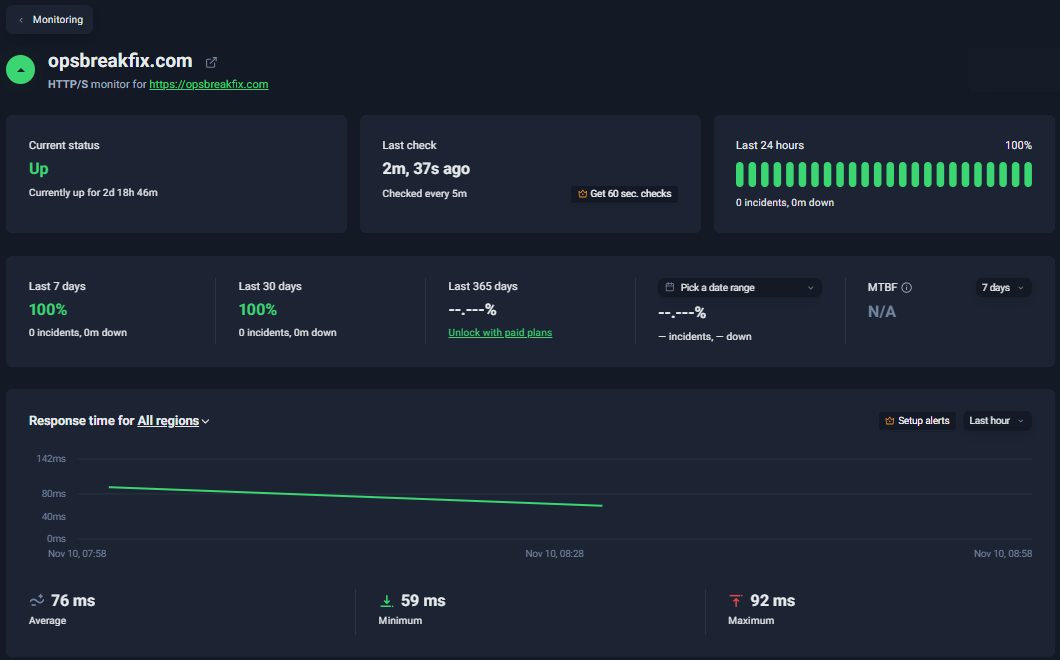
What this looks like for us. This site has one outside check: an HTTP(S) monitor on the home page, every 5 minutes, from a North American location, on UptimeRobot's free plan. It has no agent and no access to the server, and it does not depend on the hosting provider's own dashboard. On 10 November it showed 100% for the last 7 and 30 days and an average response time of 76 ms over the last hour. Its limits are part of the picture too: on the free plan, the domain and certificate expiry fields are locked behind a paid plan, so for certificates we use the check from the TLS guide instead. One check that alerts a person is worth more than a dashboard nobody opens.
What we have not verified
- The vulnerabilities themselves. We did not run the exploits, and BleepingComputer says it did not verify all of them either. N-able building a hotfix suggests at least some are real.
- The affected versions. Only the researcher's test build (2026.4.0.31, pre-release) is named, and N-able has published no list.
- The hotfix timing. The midday-EST estimate comes from one report, not from a statement we could read directly.
- The earlier incident details (CVE-2026-18577, Take Control and Cloudflare Tunnel persistence) come from GBHackers' summary. We did not check them against CISA or N-able.
- Whether N-able will publish indicators of compromise. The post-hotfix checks above are our reading of the reported exploit chain.
Related guides
- Monitor a restic backup from a systemd timer: a heartbeat that alerts on silence, independent of any agent or console.
- Troubleshoot an expired or invalid TLS certificate: checking a service from outside, the way your users see it.
- Manage scheduled jobs with cron and systemd timers: where persistence hides on a Linux host after a compromise.
- Backup monitoring with heartbeat checks: the dead man's switch pattern in detail, with exit-status alerts and restore tests.
Sources
- N-able status dashboard, event 202561: https://uptime.n-able.com/event/202561/
- BleepingComputer, "N-able takes cloud platform offline after 30+ 'zero-days' published": https://www.bleepingcomputer.com/news/security/n-able-takes-cloud-platform-offline-after-30-plus-zero-days-published/
- GBHackers, "N-able Takes N-central Servers Offline Following Disclosure of 33 Critical Security Vulnerabilities": https://gbhackers.com/n-able-takes-n-central-servers-offline/
More from the blog
- wfx GitHub Actions Stealer: Check Repos, Cloud Roles · News, 2026-11-12
- Microsoft 365 Outage 12 Nov 2026: What To Do · News, 2026-11-12
- Appwrite Incident 1 Nov 2026: Rotate Secrets · News, 2026-11-07
This article is educational information, not incident-response or legal advice. Verify package status with your operating system, hosting, or runtime vendor.